Casio BE-300 FAQ. Second edition, complemented by

Table of contents

  • Part 1 - Table of Contents
  • Part 2 - General
  • Part 3 - Operating System
  • Part 4 - Alternative shell
  • Part 5 - Iron
  • Part 6 - Networking
  • Part 7 - Synchronization
  • Part 8 - Problems
Here is the first part of the FAQ (aka FAQ) for the wonderful machine Casio BE-300 Pocket Manager. A list of questions and answers will be constantly updated. If you know of a tricky issue, and the more you know the solution, write, and your information will be included in the FAQ.

Common questions

What is the Casio BE-300 Pocket Manager?

Casio BE-300 FAQ. Second edition, complemented by
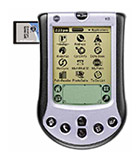
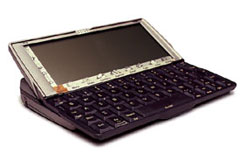
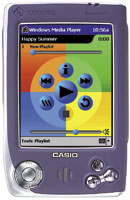
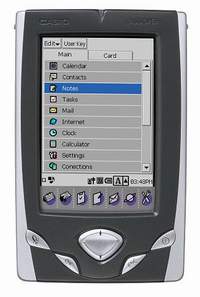
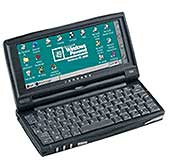
Casio BE-300 - Pocket PC "average", which occupies an intermediate niche between low-end (entry level) Pocket Viewer and top models from the Pocket PC and Pocket PC 2002. In the Casio BE-300 has a 64-bit processor 166MHz NEC Vr4131, 16 MB of rewritable ROM and 16 MB of RAM, used to run programs.

What are the key differences between BE-300 from the E-125?

Screen with a passive matrix and slightly smaller, there is no speaker, microphone, infrared port. Plus an interface designed by Casio, it is not similar to the Pocket PC, non-volatile flash-memory recording (memory, as in a desktop computer, is actually divided into "hard disk and RAM).

How long does the battery last?

When working together with sound and moving images - about 3 hours, reading books and not the brightest illumination of up to 5 hours.

And what does "battery lasts for a week of work?

Casio specialists call this number, according to the fact that the average time ispolzovagniya machines - half an hour a day. Then it turns out that four hours of continuous operation (on average) is enough for about a week.

How to install the program on BE-300 without a PC Connect?

Install and run on a large computer Microsoft ActiveSync. Then locate the folder for the program with a file extension of *. cbea, copy the Cassiopeia and run (double click or a knock "OK"). Reboot - the program is installed. If there is no synchronization program, but there is a device for reading flash cards, file *. cbea can be stored on the card and run from there. Note: This operation can not be performed using the standard File Manager supplied with - he can not run.

Is there HaaliReader for the BE-300?

Yes! Here.

How do hard reset?

As such, hard reset on the BE-300 no. The usual press digging Reset clears all opertivnost memory. If you click Reset, hold down the "OK", BE-300 will enter into Safe Mode, where you can restore the factory settings from the supplied CD-ROM.

I can listen to MP3 BE-300?

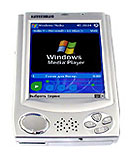
Yes, either using a standard Music Player in the sales package, or by setting the "pocket" version of Microsoft Windows MediaPlayer, whose sound is noticeably better.

I am able to write / read files on Word'ovskie BE-300?

Read yes, using the Quick View Plus, and edited yet. Text editors for the BE-300, those that can be found in the present moment, in terms of functionality consistent Notepad.

I am able to write / read Excel files on BE-300?

Yes. There is a program SpreadCE, which "understands" the files *. xls.

What file formats are generally "aware" BE-300?

If you use only standard software obechspecheniem included in the package, then:
  • BMP - Photo Viewer
  • GIF - Photo Viewer
  • JPEG - Photo Viewer
  • PNG - Photo Viewer
  • MP3 - Music Player
  • WAV - Music Player
  • CMF - Movie Player
  • TXT - Notes
  • HTM (L) - Internet
  • URL - Internet
  • DOC - Quick View Plus
  • XLS - Quick View Plus
  • PPT - Quick View Plus

What is MyCasio?

This is a service department, which develops multimedia content (movies, music, etc.), specially optimized to work on the Casio BE-300. Use the results of her work, visit the site www.mycasio.com.

What is Windows CE.Net for the BE-300 and where can I take?

Detailed information on this subject can be found here. End of

Operating System

Which operating system is used in the Casio BE-300?

Windows CE 3.0. But! In order to reduce the cost of the final product, Casio did not purchase from Microsoft a license to use graphical user interface (GUI) Pocket PC. Therefore, the "external" (that is what we see on the screen), BE-300 is different from other PDAs on the Windows CE 3.0. There are also internal differences - on the BE-300 is set slightly "stripped down" version of Windows CE 3.0, which does not hvatatet several libraries (system files) that exist in other PDAs with this operating system. Therefore, many programs written for Pocket PC is not working for Casio BE-300.

Can I install the Pocket PC for Casio BE-300?

None.

Can I install Linux on the BE-300?

No information about any one successfully installed, but distributions can search here (ie for MIPS, but BE300 list of supported devices is not) and here (here netbsd).

How to start a program, if there is a *. exe or *. cbea file?

Using any File Manager, but standard - double click or click "OK"

Can I install the software for BE300 Windows CE?

In principle yes, but with some reservations. Firstly, (see above) in the OS BE-300 lacks some of the libraries, so that before attempting to run the program for Windows CE is to install the patch (see link at the end of the paragraph). Further. Practice shows that usually run the program for Windows CE 2.11, than for Windows CE 3.0. To run the program you want to transfer the executable (*. exe) on the BE-300, and then run it using the File Manager GSFinder. If you put a file in the folder \ Storage Card \ Program Files corresponding icon will appear in the Top Menu

How to install the program on BE-300 without a PC Connect?

Install and run on a large computer Microsoft ActiveSync. Then locate the folder for the program with a file extension of *. cbea, copy the Cassiopea and run (double click or a knock "OK"). Reboot - the program is installed. If there is no synchronization program, but there is a device for reading flash cards, file *. cbea can be stored on the card and run from there. Note: This operation can not be performed using the standard File Manager supplied with - he can not run.

How can I easily switch between tasks?

Indeed, the use of memory settings, just to close the current application is not too convenient. It is necessary to download one of the numerous applications for the management of current programs, such as here.

How to make was not a squeak every 30 seconds when the battery gets?

Disable the "squeaker" in the Settings>> Volume & Sounds>> Buzzer switch>> "Off"

How to assign other programs icon under the screen?

With this program, Button Mapper.

What is Windows CE.Net for the BE-300 and where can I take?

Detailed information on this subject can be found here.

How to restore factory settings?

Run PC Connect, divert BE-300 in Safe Mode (OK + Reset), press OK again to calibrate the screen, select the PC Connection. Insert a disc that was included in the CD-ROM, a PC Connect select Tool>> Restore>> Restore Factory Defaults. End of

Alternative membrane

As in EpodXP enter Russian letters?

Quite successfully working crack RussKey BE Lite (Lite - the keyboard only, without the Russification of the interface).

But the interface itself EpodXP Russify not?

Possible. Read here and here.

How to add icons to the desktop SQPL?

These shortcuts in folders hryanyatsya Nand Disk \ Program Files \ SQ \ 1 and Nand Disk \ Program Files \ SQ \ 2 (first and second pages of "desktop"). Accordingly, by adding or removing icons in this folder, you can regulate what appears on the desktop, and rename the labels can also create a folder "3", "4" and "5" (no longer) and increase the number of pages of the desktop.

Why when you start Internet Explorer in Epod XP offers a lot of windows?

Need to close the process facelift (cross right, bottom) and it is better to move to version Epod 2.0 and above.

PC Connect does not work from under EpodXP 1.9!

It happens. For someone working who do not. Solutions there is no problem.General recommendation: The higher the version Epod, the smaller glitches.

How do I uninstall EpodXP

Nothing. Restore factory settings from the disk or restore your own "backup". End of

Iron

Which memory cards are supported?

Operate any card format, Compact Flash, including the IBM Microdrive. To work with the IBM Microdrive Casio recommends to download an update (BE300update.zip) here from this page.

I have heard that BE300 some unusual screen?

Despite that unusual call :-). Unlike most modern PDAs have BE-300 is not TFT-screen display with a passive matrix (the so-called family DualScan). The screens used in the early notebooks. They are cheaper than TFT, but have a smaller viewing angle, great "reaction time" (ie the image of "retarding" and not updated as frequently as in the TFT). And yet, the controller operates the display color in the representation of 16 bits, but displayed only 15 bits.

How does the memory of BE-300?

In the BE-300 is a 16MB RAM and 16MB Flash-Memory While, for example, Shell SQ sees only 12MB instead of 16MB. When booting Windows CE 3.0, sewn into Flash in the archived state, unpacked and written in the RAM. Also unpacked the so-called "Casio-vskie" files located in the internal Flash-memory and have an CPK. These files are also copied to RAM. The remaining memory is used by the programs launched for storing data and executable code.

Is there a modem for BE-300?

Yes, for example in the form factor Compact Flash, such as Pretec CompactModem 56K 3.3V (see here). End of

Networking

Can I access the Internet via a cell phone?

Yes. This requires a phone capable of transmitting data and the corresponding cords. Some information on these cords can be obtained here on the website Casio.

Can I get online with the BE-300 through a desktop computer?

Yes. To do this you need to download the program here, install it on a desktop computer, the settings "Beshka" tick "use proxy" (use proxy) and set the address that the program will show in the "HTTP". A detailed review of procedures is available here.

Is there a modem for BE-300?

Pretec CompactModem 56K 3.3V - $ 115 in "The computer in the palm." End of

Synchronization

What is the difference between PC Connect and Active Sync?

Only with the help of PC Connect can synchronize mail and contacts with your desktop computer. In addition, when installing programs via ActiveSync, you must manually transfer the file with the extension *. cbea on the BE-300 and there to run it through GSFinder or another file manager. But with the help of ActiveSync is much more convenient to transfer files to and from the BE-300. In addition, ActiveSync less hangs.

PC Connect hangs!

Probably the most common question in our conference. It hangs when transferring large files, sometimes when you synchronize. The majority of problems helps patch, make the most of Casio. If he is powerless to try to use the program ActiveSync (in this case, the BE-300 will need to install this utility here). ActiveSync is much more convenient to transfer files, but will not allow you using the standard Top Menu synchronize with Microsoft Outlook.

Can I transfer files to the BE-300 without using Active Sync?

Yes, of course, though somewhat "crooked." In the PC Connect is a function of "Folder Syncronization" ("Synchronizing Folders"), which performs this operation. You must specify a folder on the BE-300 and the folder on the desktop and their contents will be "equated".

Why connect to the PC Connect does not start when I insert the BE-300 in the cradle?

First, make sure the feature is enabled automatically connect to a PC (there is a tick in Coonections>> PC Connect>> Automatically connect to PC). Second, be sure to shut down Active Sync. It is not enough to simply click on the cross, to the list of processes (called by CTRL + ALT + DEL) "kill" the process wincecomm. If not help, restart your computer. End of

Problems

Mobile Video Converter can not convert the file!

First, wait. The program works very slowly and should not be upset that it hung until it really did not. Secondly, with files larger than 100 MB really have problems and there's nothing you can do.Third, make sure you use a file format, AVI or MPEG. And it was an AVI and not expand *. avi, namely, such movies have a resolution DivX (also known as MPEG-4) on CD-ROM. Such files can not convert the program.

PC Connect hangs!

Probably the most common question in our conference. It hangs when transferring large files, sometimes when you synchronize. The majority of problems helps patch, make the most of Casio. If he is powerless to try to use the program ActiveSync (in this case, the BE-300 will need to install this utility here). ActiveSync is much more convenient to transfer files, but will not allow you using the standard Top Menu synchronize with Microsoft Outlook.

What to do when a terrible hang: just a white screen?

Press both the Power and Reset, the BE-300 will be initialized until the screen inscription Starting ... nachazhat Reset + OK, and Casio is normally released in Safe Mode. If this does not work, wait until just sit Battery - up to zero, then charged again.

Time may not display: 7.00 instead of 19.00 even nastoroykah on a 24-hour format. What should I do?

This bug first version of localization RussKey BE 1.0. Swing update from www.be300.ru, the problem is corrected in version 1.11

Is it true to the BE-300 buggy calculator?

True, true. But this is, like, only the interest - they can not take it. The rest is working properly.

Why does a list of meetings begins to scroll, even though I did not click?

This is a well-known terminology, "not a bug, a feature." That is, it's not a bug, so developers have conceived. Uncomfortable, but nothing helped.

PC Connect does not work from under EpodXP 1.9!

It happens. For someone working who do not. Solutions there is no problem. General recommendation: The higher the version Epod, the smaller glitches.

I moved to the BE-300 a few pictures, but the Photo Viewer does not show all

Most likely, the images have a resolution higher than 640x480. To view photos (and other pictures) with this program, they must be in JPEG (*. jpeg, *. jpg), BMP (*. bmp), GIF (*. gif), PNG (*. png), resolution should not exceed 640x480 pixels. Larger images can be viewed by third-party applications, such as Resco Picture Viewer.

After working in the network off feature auto power off. What should I do?

The system is configured so that prohibits auto power off during a session of data transmission. So after work on the Internet then restart BE-300 (soft reboot), then turn off and turn it on again. Auto Power Off function is restored.

Why connect to the PC Connect does not start when I insert the BE-300 in the cradle?

First, make sure the feature is enabled automatically connect to a PC (there is a tick in Coonections>> PC Connect>> Automatically connect to PC). Second, be sure to shut down Active Sync. It is not enough to simply click on the cross, to the list of processes (called by CTRL + ALT + DEL) "kill" the process wincecomm. If not help, restart your computer.

Russian keyboard cut to the width of the control panel installed in the shell Xpod, although functioning

Setting RussKey BE Light, in the registry key HKEY_CURRENT_USER \ ControlPanel \ Sip \ DragStyle need to change from 1 to 0. After that, the keyboard will be displayed fully. The authors, translation:
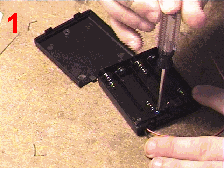
Sasio BE-300: Feeding with a spoon

Small capacity internal battery - one of the main drawbacks in general, very good cars Casio BE-300 Pocket Manager. We already wrote about some ways to "extend her life" and one of these methods, you will recall, was an external charger for batteries. Soon these "boxes" for sale in MakTsentr, but so far why not make this device yourself? Especially because it is a snap. The easiest option in the assembly generally takes less than 10 minutes. Slightly more complicated is useful to you, if you intend to use nickel-cadmium batteries. They are the cheapest, but most likely to light up when closed. So what we need. Pin DC power diameter of 1.7 mm, and a box of four batteries with a lid and switch, fuse 1 amp. All this is easy to get on the radio market, or in the appropriate store. In addition, you will need some wire (good fit wire from the headphones, bifurcated into two halves - it is flexible). And of course the soldering iron and the battery yourself (this can be battery powered) such as AA (the usual finger). Proceed.
Sasio BE-300: Feeding with a spoon
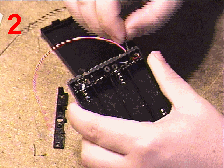
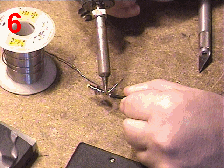
Remove the lid boxes for the batteries, unscrew the screw that holds the battery cover switch inside the box. If necessary, cut through the plastic joints and remove the battery cover switch.
Sasio BE-300: Feeding with a spoon
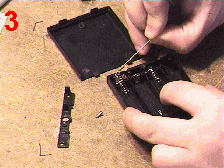
Under the hood there are two wires (usually black and red). Pull them with tweezers, and then remove the soldering iron from the switch. Wire from the "plus" contact (usually red) better to pull out of the box, so as not to melt it (here, however, it all depends on what will fall box for batteries).
Sasio BE-300: Feeding with a spoon
Join the fuse polampera the switch. It must be soldered to the negative leg, where there was (if you have the same type of boxes) black cord.
Sasio BE-300: Feeding with a spoon
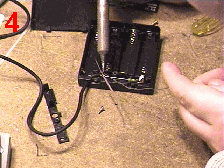
Solder the new cord to the free end of the fuse to the positive battery terminals. Pass the wire through the hole in the hull and tighten knot.
Sasio BE-300: Feeding with a spoon
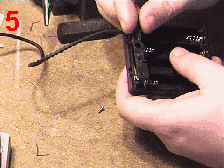
Replace the battery cover switch, fasten the bolt and slightly oplavte around the edges for strength.
Sasio BE-300: Feeding with a spoon
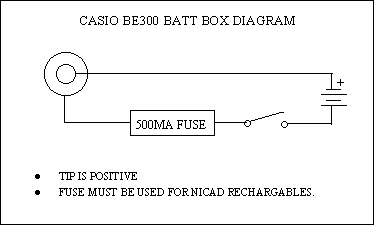
Solder the free end of the wire pin.Came out here the following scheme:
Sasio BE-300: Feeding with a spoon
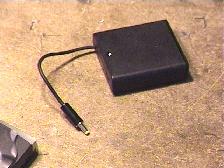
and now this box:
Sasio BE-300: Feeding with a spoon
Practice shows that when using alkaline batteries life expectancy "Beshka" uvelichivatsya approximately two times, and slightly less than prolong her life nickel-cadmium batteries. So that life is worth trying. The authors, translation:
When the handheld machine requests a

Once all the PDAs were fed by replacement elements ... Glorious was the time. Problems prematurely shrunken the battery simply does not exist. But there was (as yet!) The problem suddenly depleted batteries. Especially in the first family of computers Windows CE. Were hungry machines. However, "unexpectedly" with interchangeable elements did not exist. Battery life does not end suddenly. It is a process, and gradual, which has many special features. Here are flashes of the discharge. Here again blinked. Here is the computer the screen went ... off? Yes. A battery - live. Two weeks, feeding the computer's memory and thereby saving the user data from the irreversible destruction. Since the battery is another matter. Even the most comprehensive and long-life lithium-ion batteries lose exchangeable elements on many items. And to the temperature they are too sensitive, and "die" with virtually no warning, and the state of deep discharge (when the balance of power is barely enough to maintain data integrity) as a horror not like it ... Let's talk about food? The problem, then the most that neither is pressing, relevant for all, without exception, owners of PDAs. True, on the old typewriters speech there. What we hold on to the ruins of luxury?

Battery "fingers"

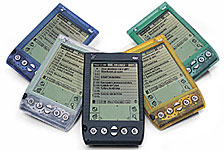
In the handheld computers used two types of replaceable batteries - size AA and AAA. The first serve of keyboard computers Psion 5mx. Second - in typewriters Palm m105, m125, HandEra 330, and probably even in some clones of Palm, which I have not had a case. Battery Battery discord. Manufacturer strongly recommends the use of alkaline elements, which in the west referred to as "alkaline". And Palm itself and said - only Duracell Ultra and nothing else. Like, only in this case is guaranteed to work the computer for a month ... But what - a month? Half an hour a day? Hour? Four hours? With the backlight on the screen, or without it? With the use of peripherals, modem, memory card? It is not clear. Let us say at once - Palm computer models with monochrome screens (all up to modern m125), receiving power from replaceable elements, have the longest operating times. If you are going on a long trip, and even in places where finding an electrical outlet can be problematic, it is best to bring a Palm m125 and a pocketful of batteries.
When the handheld machine requests a
Palm m125
Such situations are not as rare as it might seem. Electricity is not available, not only in the taiga, or more often on the shores of a forgotten god of the river (where the hell gave up the computer?), But also in the car long-distance trains in the airliner cabin or in a provincial hotel, where, besides Sherbatov carafe of the hallmarks of a civilization is only cockroaches . In fact - as recharge the battery is stranded on the train "Moscow - Khabarovsk? A pocket computer in a busy rail travel that magic wand. Sleep has no strength, books still ended two days ago, but a small computer - so he is always with you ... And how to recharge the battery in the cabin of a luxury foreign aircraft, where the outlet seems to be there, but all some strange, not ours? .. The apparent goodness of replacement elements there are also clear disadvantages. Moreover, the cost of batteries leave behind, because it is something just not essential. Tridtsatirublevy kit alkaline elements are not razzorit any PDA owner, even though the high cost has been criticized holders Palm `s that are tailored to your machine nickel-metal hydride batteries, size AAA. Sets of disposable items, even at very intensive use (with backlight on, which increases power consumption two to three times) is enough for at least three or four weeks. However, only in the case of high-quality batteries. But cheap items apply not only unprofitable (die like flies weakly winter), but also dangerous. Alkaline batteries will never flow. They are produced by the most advanced technology of the most well-known companies, and the dog eats in the production of chemical power sources.A nameless Chinese batteries may leak, did not even really worn out (electrolyte leakage occurs at extremely low battery discharge when the zinc glass, used as one electrode and the reservoir at the same time, worn down to the limit). Imagine what would happen to your computer for chemical attack caustic liquid ... Another problem arises when replacing the battery discharge fresh. In the computer, Psion 5mx has a back-supporting power of memory and preventing the erasure of her information. Therefore, replacement of batteries in the 5mx pushover.
When the handheld machine requests a
Psion 5mx
And in the Palm `s backup battery no. Instead, it uses ionistory - large capacitors that hold the electric potential (and provides power chip RAM CPC) for a minute. Gape slightly, and the data are lost. And the road is a real catastrophe - a desktop machine next to no, can not be restored. However, a minute is not that a little time. In fact, the data lost is not so much from the clumsiness of the owner PDA, but on the low-quality ionistorov (which are susceptible to aging and loss of the initial characteristics). What do you do? For Palm m125 output is obvious - use a memory card with capacity of at least 8 megabytes for complete system backup, or at least to store basic programs that may be needed to restore the system "in parts". For older machines m105 and m100 have to buy attachable to the system connector of the flash memory. It works like any memory card, but with nothing is not compatible (and are more expensive flash memory cards - about $ 70 per 8 megabytes, the other modules of capacity does not happen). However, it is enough before you go to replace polurazryazhennye items fresh. Yet thirty-trip Tmutarakan befall extremely rare. Usually have to be away from home is not more than two weeks. And this term monochrome Palm `s and their batteries are quite capable.

Cordless fun

We, users of handheld computers, we must be prepared to ensure that replacement batteries obsolete. Very soon (we can say - today) all PDAs will be colored. A power color screen and backlight, such that the dry cells did not pull. That is, all handheld computers of tomorrow will be equipped with only the internal battery. And again - battery Battery discord. For example, a family of computers Pocket PC (I suspect that not all) establish replacement batteries. That is, a user can open the lid, turn off the regular battery and replace it svezhezaryazhennym. Example - the first Russian handheld machine Rover P6.
When the handheld machine requests a
Russia's first PDA Rover P6
Roughly the same are arranged and some clones Palm, in particular - Computer Sony PEG-T415. True, the conclusion is made vpriglyadku - I just saw on aluminum Sony battery cover, but can you replace the battery yourself, do not know ... But just know that at all "native" typewriters Palm, starting with the m130 and older (and also on the vast majority of non-ferrous clones), such replacement is impossible. Computer case is made one-piece, and non-removable battery (although gold hands and a light head barriers do not exist). Multimedia capabilities of handheld computers - multi-colored display of information, audio and video - requires sacrifice. However, in this respect a little easier to have the owner of a color Palm, because the battery life of these machines is greater than the Pocket PC (due to lower power CPU, the lack of sound chip, a modest-sized screen and simply due to the lower intake power electronic components).Computers Palm m130 and m515 from a fully charged battery will live an average of 7-8 hours. This time depends on the mode of backlight, which can be enabled by half (from m130), or the disabled at all (in m515). Seven hours is enough for two or three days of moderate use of machines or a week - as the organizer (ie, under the system of warning of upcoming events, brief addresses to the contents of the address books and so on). But reading books in the car long-distance trains are already in question. Not to mention trips to the "wild" region ...
When the handheld machine requests a
Long-liver Jornada 720
Exit - to use replaceable batteries, and if it is not possible, then external power sources, including fueling. All computer makers Pocket PC released their handheld external battery packs that increase battery life by about half (optional battery pack to the computer keyboard Hewlett-Packard Jornada 720 extends battery life up to 24 hours - an absolute record for a PDA). The disadvantage of such devices is a considerable cost (here in Russia from 80 dollars) and is not quite pocket size. With docked battery "jacket" modest-sized machine Casio BE-300 is similar to wow brick. Additional power supplies that can be used to recharge the batteries run down - it's containers, which can accommodate four dry cells connected to the power connector, and if it is not (like Palm), then to a system connector - to the appropriate contacts. A special selection of voltage parameters (usually 4-6 volts) is not required, fresh batteries will recharge the battery until it stranded until the potential difference at the terminals are not aligned. This should avoid two things - the reversal (reverse polarity battery to the power connector), which is fraught with literally explosive lithium battery and connectivity discharged batteries. In this case, the situation may change, and the battery drained even more podzaryazhaya "half empty" dry cells. The design of the external power supply on replacement elements are so simple that it is useful to construct a device to force any more or less "rukastomu" to the user device. Although if you want (and, of course, if possible) can find the device manufacturing industry, which produced both here and abroad. Incidentally, the battery unit further is better to use nickel-metal hydride batteries rather than disposable items, and, very large format. Still carry a computer, and this homemade (or homemade - no matter) are not going to block - is inconvenient. A turn at night to recharge - simply ... one more sad features built-in batteries. The service life of lithium-ion battery does not exceed two years. Then, the battery must be replaced. But housing construction PDA Palm does not do this, change will have the entire machine. In the case of expensive models, this means that we must be prepared every two to three years (most likely the producers hedged and the battery will last a little longer claimed the term) to spend 400 dollars on the purchase of new machines. Although the old (in the case of the Palm) the owner is completely satisfied. Even worse owners late model Palm `s. In the m130 and m515 install a lithium-polymer batteries, which differ in a very short survival for the sake of compactness. Truly - ideal computers do not happen.

Not so bad and all

For a moment digress from handheld computers and look at cell phones. Why is the problem of limited duration of the cell phone we are concerned (to be confirmed - specifically me) less than the problem of untimely "landing" PDA batteries? Very simply - cell phone only works in metropolitan areas and their surroundings, and therefore take it with you on a journey to the Russian province does not arise and thoughts.Should not in this case to reconsider its attitude to Pocket PC in general? This is not a standalone device capable of providing any user's needs. This - the mobile extension of PC. And because too long and too long absences from the main working machine (personal computer) are meaningless. For such journeys need a different technique. Let's just say - a laptop that rests until a certain time in the luggage of a computer-wanderer, and a pocket computer, which frees the owner from the need to rummage endlessly in suitcases, pulling out a portable machine to remember the right address or kill an extra hour of anxious to move. And then everything falls into place ... By the way, the digital photography autonomous power supply problems are magnified. Somehow, but a pocket machine is powered by built-in battery during the day. A digital camera - a little over an hour. But no one needs from a digital camera is impossible, since it too - the extension. It turns out that the life of an itinerant intellectuals centered around a laptop. Starts with all the mobile fun, and the rest - only optional (but very nice) for details. So is the PDA, which I so foolishly, so easily "hooked". The authors, translation:
Handspring future in Russia

Karmannye computers Handspring Visor American companies have won great popularity all over the world and recently have started to enter Russia. Distribution of these devices in our country is engaged in Company MakTsentr.
Handspring future in Russia
Continuing the theme of the recently raised PDAs, we asked the director of "MakTsentr Dmitry Havzhu to answer our questions about the fate of Handspring in Russia. - What channels are now coming Visor PDA to Russia? In what quantity? As far as they are visible in the Russian market? - System supply of these devices in Russia is quite complicated and cumbersome. Headquartered Handspring is in America. In Europe, a branch of the company - Handspring Europe, which gave the right to work with certain countries in Central and Eastern Europe, the Hungarian company MDS Holdings. MDS, in turn, signed a distribution agreement with our company. Number of units delivered is relatively small, but their share had reached 15% of the total CPC family PalmOS. This fully corresponds to the proportion Visor, which they occupy in the global sales structure.
Handspring future in Russia
- You have an exclusive agreement with Handspring? Does Russia have other distributors? - To date (January 2001), we are the only partner of MDS in Russia. The term "exclusive" we try not to use because it does not exist in our contract with MDS, or MDS in agreement with Handspring. Uses the term sole disributor, which can be translated as "unique", but the difference in this. However, the effect of the current version of the agreement with MDS completed and can be expected in Russia there will be other distributors of products Handspring. - What is the reason the possible transition to a different model of distribution? What companies can still take the case? - Management of MDS is not completely satisfied with the results Visor sales in Russia. They believe that the presence of 3.2 distributors significantly increase sales. We believe that the problem lies elsewhere. Firstly, the business model of Handspring very little work closely with the channels. This company apparently still does the basic rate on direct sales to users. This is reflected in the fact that our purchase prices are very low, at 6.1%, differ from Handspring prices for end users. This low margin is greatly reduced interest in the product from our dealers. Validity of price protection only 2 weeks, which means that goods can be ordered only in small portions. There are also many other restrictions that are very difficult job in the ducts. Secondly, the Handspring on the market there were some real competitors, which have seriously challenged the benefits Visor. The most serious of the existing - Sony CLIE. Very soon, and Palm with an expansion slot in the format of SD. These devices are deprived of basic marketing Visor argument - the possibility of using the device independently, without a desktop computer, now it can do, and others. - But the Visor as he was, and remains the most expandable PDA through the use of slot Springboard ... - Yes, it is certainly true, but in Russia these arguments are very blurred. What are the most interesting plug-ins Springboard? First, VisorPhone, Visor turns into a telephone. To sell these devices in Russia is required to pass a certification process in the State Communications and Rostest. It costs about 7,000 dollars. On one such costs are not ready to go. The second interesting module - GPS receiver. Sell ​​it in Russia too it is impossible before the patch in the law on state secrets. So it remains a bit of interesting extensions - Backup Module, MP3 Module and Modem. - You mentioned a new handheld Sony CLIE. Can he really drive the other PalmOS devices? - The success of the CLIE is entirely in the hands of Sony. In itself, the device is very interesting and very competitive.It all depends on the determination of Sony to promote this model to the market, you know that Sony will be a very serious battle with Microsoft for the game console market, which in this situation will mostly remain the resources to promote hand-held computers - time will tell. - Back to the devices the company Handspring. What other company can qualify subdistribyutora? How might this affect the market? - I think that in Russia, very few companies who may be interested in such work. First of all, Elekton "and" Camelot. " Perhaps, "Notebooks theft alarm." No one else comes to mind is not. Widening the circle subdistribyutorov likely have no impact on the price situation, because right now profit in this niche is close to zero. Picture may change qualitatively, only if we achieve a more favorable working conditions of MDS, or be able to establish direct relationships with Handspring, eliminating intermediaries. Sources, Materials:

Vendors do not think about Russia

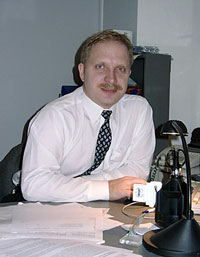
On the PDA market in Russia, about how personal digital assistants (PDAs) will evolve in the future and the problems that arise with them in Russia, we talk to the director of "MakTsentr Dmitry Havzhu. Yuri Sakun: What is the structure of sales of pocket PCs in Russia?
Vendors do not think about Russia
Dmitry Havzhu: Our findings are as follows: PalmOS - 65%, PocketPC - 22%, WindowsCE - 3%, Psion - 10%. Structure of sales of handhelds in Russia is very similar to the average picture, which shows the IDC, however, there are some differences. Firstly, the share of Palm OS in Russia a little less European and American. Although I do not believe those figures in sales Palm, which lead to the U.S. - 75-80%. This estimate seems very high. The second difference is the Russian market - the structure of niches PocketPC, besklaviaturny PC. In fact, in America, pretty much sold iPaq Pocket PC company Compaq - their sales significantly overlap the sale of Cassiopeia. Noticeable Hewlett Packard with its Jornada 545/548. In Russia the opposite situation - iPaq computers sold very little, HP is not at all. The fact that Compaq officially imported to Russia, only one batch of these devices, about twenty pieces. Everything else - is "gray" delivery. But dealers are not interested, because the supply of "gray" channels too small, the conditions - not interesting, there are problems with maintaining the equipment. Unlike Casio Compaq position is quite active. The company has representation, which also deals with handheld computers, and therefore Casio PDA for sale in Russia quite a lot. JS: By the way, on the iPaq: I saw an example in which almost the entire Russian representative office of one of the firms was equipped iPaq ... DH: I do not know any other company in Russia, except for Microsoft, which would have worked on the iPaq. JS: A demand for iPaq is? DH: Yes, quite high. Despite the fact that the iPaq (Model 3630 and 3650) - pretty whimsical and often break the machine. The failure rate - 27%, ie more than every fourth owner of the PDA iPaq appealed to the service. JS: And what's the problem? JH: Problems of three. First, sometimes the iPaq comes off the inner loop, because of what the image on the screen becomes a mirror. The second problem relates to the design of the screen: the iPaq matrix is ​​separated from the shield thin air layer, which sometimes hits the dust. Mote looks like a broken pixel. Pull the speck out impossible, Compaq also has not yet figured out how to solve this problem. And when the user accesses this problem in the service, he usually says that did not need to use a computer in a dusty room. Other problems - with buttons and snaps the stylus (if you accidentally insert the stylus is not so, as expected, then the stylus latch is broken). In general, the demand for iPaq is, even despite the fact that today it is - the most problematic car. YS: How Well then demand? DH: First of all, the iPaq screen is totally unique: it has only a PDA, which can operate in direct sunlight. On the screens of other computers with nothing to be seen. Secondly, Compaq - a brand that is appreciated by many. JS: In your opinion, what is now the most successful model of the PDA market? DH: It depends on what class of devices considered. If we talk about the Pocket PC, the most successful, in my view, the model - Cassiopeia E-125 and more stylish, EM-500. They are in sufficient quantity supplied to Russia, and they are quite popular. Unfortunately, according to unofficial information, Casio is going to curtail the production of E-125. This affects the supply in Russia: an application in March-May for the supply of PDA from Russian suppliers have been satisfied with just 10 percent. JS: If we talk not about the absolute figures of sales of pocket PCs, and on the dynamics, then how big the increase in the PDA market? DH: The market is very dynamic. Sales volumes are growing at 80-90% per year. Although it is clear that this dynamics is only possible when initially small volumes of sales and eventually sales growth rates drop.JS: Who is the buyer of handheld computers? DH: We ourselves are very interesting. From time to time we conduct a study to clarify this issue. Typically, handheld computers are not buying as much for themselves, "how much for a business to use them in their work. But users are buying them for ourselves, not by companies. Corporate buyers slightly, the share of corporate sales do not exceed 10%. If you look at this issue from the perspective of sex buyers, the buyers are more men than women. JS: Can we now create a PDA-based mobile office? DH: It depends on what to keep in mind a mobile office. If you invest in this concept is the possibility of normal operation with the text and table documents, databases and presentations, the ability to connect to the LAN, then, in my opinion, better focus not on the handheld computer and a laptop. PDAs more convenient to use as an adjunct to a desktop or laptop computer for quick access and editing of information transferred there, as well as for solving a class of other special tasks in this example is clearly visible difference in the approaches vendor to the creation of handheld computers. One professed manufacturers of devices such as Palm, another - manufacturers of PDAs based on Windows CE. The former believe that the CPC needs only the simplest and most necessary human services: address-phone book, notepad, email etc., but they should work flawlessly. What makes Microsoft a part of Pocket PC, differs fundamentally from this approach: the Pocket PC is literally all that there is a "big" computers, all that is needed for "cruising" the business. These computers, in theory, should be totally replaced by a man and a laptop in part - a desktop computer. In fact, the PDA is not always a good thing. But many buyers believe that this approach is better - if the device offers more services and greater opportunities, so it is better. Often, however, many experienced users, having worked for some time with the Pocket PC, go back to Palm: they understand that more important - comfortable work and quality execution of multiple services. JS: And what is the idea, in your opinion, is more promising? Which of them as a result will win? DH: I think they will live together. But I am closer to the idea of ​​Palm, PDA focused when only the most necessary functions, everything else handed to other devices. The most beautiful, this idea will be implemented shortly, will come when Palm'y with an expansion slot where you can insert anything you want: the MP-player, and a modem and other devices. YS: What is missing from modern PDA? DH: Of course, modern PDAs are not enough modules exchange information with each other by radio. Bluetooth or something like that. If this option appears, it will transfer all of the platforms to a new level. And of course, virtually all manufacturers of PDAs are working on implementing a wireless network access. The one who can do it better and faster, can count on the leadership. JS: In the future there will be several platforms for PDA or will a single standard? DH: I think there will be several platforms. Only the distribution between them in the market change. Proportion of Pocket PC will increase, and Palm - reduced, albeit marginally, PalmOS in the foreseeable future will dominate. As regards the distribution between vendors Palm OS devices, now working here are basically three companies: Palm, Handspring and Sony. In Palm now - about 75% of the market, but the intention is to oust klonmeykerov Palm. The situation in Russia with Handspring is not entirely clear, but Sony has even officially in Russia does not supply its handheld computers (and other computer products). And in Europe, Sony officially announced its PDAs. YS: The Russification no problem? DH: The main problem is that no one vendor does not take into account in their designs that they will use in Russia. In connection with these developers Russifiers have to spend quite a lot of effort to ensure that Russify PDA coming to Russia. This area of ​​development has become quite competitive and is now on every platform there is some good quality software localization.YS: Softonic sold separately? If I had brought some PDAs, say, from the U.S., what should I do? DH: For the Palm and other PalmOS devices can purchase from us for $ 30 package "Russian Palm", which includes the crack and a set of akssessuarov to facilitate the life of Russian users: a table with "graffiti" sticker on a keyboard with Russian letters and Silky Board - an original development of the Russian firm SoftAVA, virtual keyboard, which is glued not to the working of the screen, Palm, and the one where the icons are placed, causing a variety of programs. In addition, the disk placed over a dozen other useful programs. This package - our breakthrough, it significantly helps us in promoting the platform. As for other platforms of Russification, the situation was. For EPOC32, there are two good commercial localization: "Elbrus" - our development, and "Everest" from Paragon. Our name has appeared before, but in the "Paragon" decided that their crack should be addressed to a high mountain and named it "Mount Everest". These products, according to independent experts, are very similar in function, serious arguments in favor of this or not, moreover, that our support normal printing on all popular printers. Approximately the same situation with the Russification of Pocket PC, there are competing programs from the company - "Paragon" and "FizTehSoft. We distribute both. The authors, translation:
Valery Babanov now knows the measure

Rather, they have recently met. Icy, unapproachable, he surrendered the fortress, opened on 10 minutes, stone embrace. True, not even allowed to bring a camera to film it in a moment of weakness ...
Valery Babanov now knows the measure
"6310 m" - growled the altimeter on the clock. Valery stood on the highest point of the peak. To the right preparing to attack the black clouds of snow, the sun shone on the left - and no nails! ... "Mountain - a kind of active meditation, or purification through physical hardship, - but hardly our hero, purified and enlightened, in those moments was aware of it. The goal was achieved. All thoughts, limiting concentration on the route retreated, giving the place of weariness. He stood there, got in touch with a partner, Igor, who was on duty in high-altitude base camp somewhere very bottom at around 4000 m and blurted out the good news: - I'll try to get closer to the precipice, so that you could see me! - Do not do it! - I still really want to look down the cliff! - DO NOT! ..
Valery Babanov now knows the measure
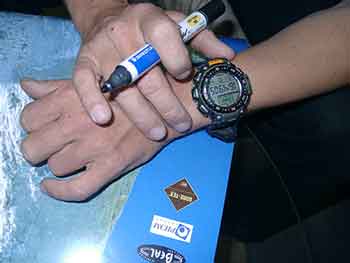
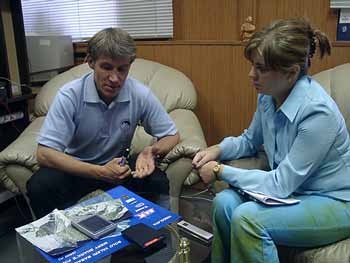
Valery Babanov: The camera was just below 150 meters from the top of the peak. As I stood at the top, I really wanted to shoot a few frames. Finally! I'm here! But then some inner voice, intuition (the voice of God! ") Prompted me:" Do not get down now! ". If you go, then the back has not come back. Gore seemed opened to me a few minutes of the corridor and allowed to stay on it for a while ... very short time. According to legend shark fins, leading to the peak of Meru - a road to the Center of the Universe. Over the past few years there have been about 15 attempts to reach the coveted top, but they all failed. Only a famous American climber Peter Takeda tried "ride" Shark's fin is threefold: the last one was this spring (at the same time and Valeri was doing his first attempt), but the mountain once again did not let him. More than three attempts will not put. Takeda and tried to forget about it. VB: We sent him a letter as soon as I descended. It has been almost two weeks. So far, no response from Peter, even though we where with him and his partner this spring with storm peak, very good friends. Perhaps only one could "miss" measure. But all these expeditions - there were so many. Some tried to take it one fell swoop, while others starve. But all as a result of retreating. Every time climbed to 4 - 6 people ... And it could take, as I now think of only one. Valery, of course, did not say "elected". But it turns out he is elected. Work on the route of such complexity requires unfathomable to the average person a concentration, perseverance and, necessarily, a great experience. We must live in the mountains, to own such a technique of movement, so to feel them to be able to talk to them. He spent 25 years of his 36, "working routes. His "experience, the son of hard errors" had been raised and brought up 200 expeditions. VB: Of course, I became a solo climber at once, somehow gradually came to this. The fact that the team I do not feel too comfortable, I do not have freedom of decisions and actions, I can not improvise on the fly. And then somehow I got used to count only on themselves. In my opinion, it is quite logical. Itself, one can predict itself can be trusted or not trusted in certain situations. In the team scheme is much more complicated. Olga Gorbonosova (HPCru): So you actually simpler and easier to work on one route? VB: Of course, otherwise I would have been the man command. OG: This time it's easier dalas this mountain? VB: That's not to say. Generally, the bigger the mountain, so it is more expensive. In all senses: the harder given, and the more expensive it cost to rent a corridor on her. OG: So you paid for each meter? VB: No, of course. If the mountain in India is higher than 6500 m, it is more expensive.My top came up under this tariff. She was a little lower. At least according to my measurements. By my watch. OG: Is it possible to believe in your watch? VB: And why not? We have already checked them in France, and they have not sinned. Valerín hand decorated with smart watches Protrek, gigantic size, given to him by the French association of mountain sports, where he works as a coach. It seems that they can settle the cuckoo !:-)) What they just do not know how and what properties does not only possess, except that the coffee is brewed !:-))
Valery Babanov now knows the measure
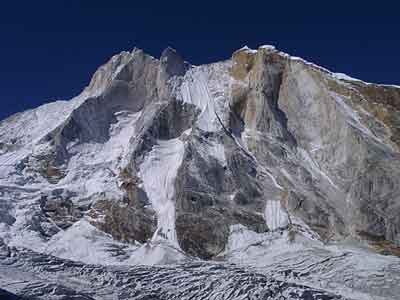
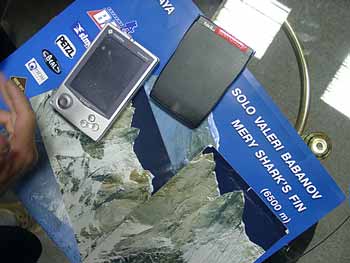
Most of Valerín route ran along the ridge. VB: I went to the back side of the mountain wall, two meters away from the comb, and if you draw a route on this picture, it will be dashed. :-)
Valery Babanov now knows the measure
The place to which I got, not entirely a high point. The highest - it snow cornice, it was up to five meters. If it stand, it could collapse. Where I stood, was not visible base of the mountain, the wall slowly go down somewhere in the distance gleamed Glacier, 2 miles below me. And I wanted to Igor saw me on top and was headed to show off the ledge. But he was dissuaded, saying that the ledge could collapse, and the Spaniards I've seen. At this time the measure intended to storm still two whole expedition Spanish and Japanese. Valery had arrived, and perhaps this fact as the highest impact on the decision to allow the Office of the heavenly possessed by the idea of holy svyatyhJ. During the ascent the weather was unusually nice and warning. VB: On the ascent took me 6 days. During this period, I almost did not rest, except sleep, and slept little, began to operate the route at night, hours are 3-4, so we have a long throws. Afternoon light your support. If you start in the morning, then finish the evening for sure. Can not see anything, tired. At night, the weather is more stable. But the cold and scary, shoes like tin cans on your feet hang peremorozhennye ...
Valery Babanov now knows the measure
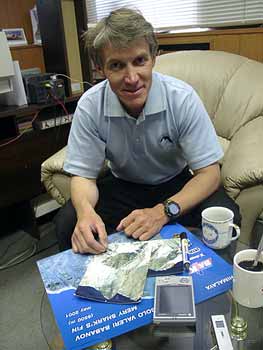
Valera bit stingy on the words and a very benevolent at the same time, so we must try to grasp his thinking on the fly. Sometimes you catch ... This man is damn infectious and somehow child-like laugh. Adult child who is not afraid to dream. Himself a magician. For the type of fragile, low, but the extraordinary strength lives in his trained body. And still he needed the insurance, the feeling, if not firmly under their feet, then to the outside world. At least on the radio. Need to have someone waiting at the bottom. This time - partner Igor, in the past - his wife, Olga. And, of course, letters from home. VB: Igor gave them to me directly by radio. For all 6 days I have been in touch with Igor. The day came during the ascent of 2-3 letters. As a rule, from the closest people. During my recovery Kaskiv not only supported me in a moral sense, getting my mail, but my companion. He has a strong toothache, he was tired of the order of seats in the camp in a tent and had already begun to ask home, suddenly found himself a pleasure. Toys on the Pocket PC. At this time, before climbing high-altitude base camp visited HPCru correspondent Andrey Kuznetsov, who debug the PDA, so much so that he began to regularly take even a remote mail. In addition, Andrew has brought a solar panel, which quickly managed to feed the voracious color handheld. Good, and the weather was sunny, very convenient for feeding :-). O.G.: The last time the Americans you were named Russian James Bond for such technical equipment of the expedition, as well as this time responded to the handheld computer and satellite phone Spanish and Japanese climbers? VB: Well, most of all, of course, surprised the Japanese. Especially because they have something other than the receiver was nothing. Two days later they came to me to send mail and receive letters from home and very happy this opportunity, and then we went on the routes. OG: And you had the feeling that all will turn out? VB: Yes, of course. I've programmed yourself for success. Firstly, to calculate precisely the time that I needed, changed the route. Yes, indeed for the very top, not the route I'm doing it. Painfully attractive and difficult it is! She draws you like, makes up for it. And then on top of one was not. But the way to the top seem easier than it really is. Knowingly array measure called the center of the universe. While Shamballa I did not find :-)). OG: And to us at the last your letter seemed to have found ... :-)) VB: Just me overwhelmed emotions, feelings. I re-lived all the climbing. When the top 200 meters left, I remembered that I forgot the camera in a backpack, but decided not to return. I had a feeling that I came to clean the mountain, and must be absolutely clean. Two kilometers from Meru were black clouds. It seemed to me that they seem frozen, missing me, so time to return was not. I overcame a 15-minute firn slope and ended up on top ... ... Valery stayed on top in just 10 minutes. Not more - not less. He again some inner flair caught the moment when we should leave. The audience was over. No sooner had he a little satellite, as the sun disappeared, and one after another ran the clouds, forming a black canopy over the crown of the measure. Gore was tired of his visitor, she was going to sleep ... Yes, and the day was coming to an end and our hero had time to reach his home - a small mobile platform, left at the bottom. The next day, Valery was already in high-altitude base camp with his friend and wrote us the latest on this expedition letter ... VB: first sat down to write out of duty, but then got so carried away as if anew all survived. It was very important to my friends learned everything as quickly as possible on myself, I was eager to record all his experiences right there on the spot, at the foot of Meru. I already knew it, I saw a neighborhood with its top part of my soul will always remain with her. When Valery wrote a final letter, he discovered that the screen is Kaskiv few suffered from emotional injuries from the stylus. At the bottom clearly look through the point-target, the appropriate shaped as letters virutalnoy keyboard, so much so that you can blindly, with the screen off, learn to type on it :-).
Valery Babanov now knows the measure
The authors, translation:
Closing Remarks: New products from Casio

Closing Remarks: New products from Casio
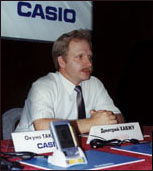
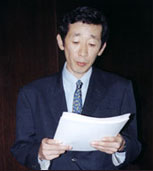
Yesterday the company and the company MakTsentr Sasio Computer held a joint press conference on the Russian market the output of a number of new products from Sasio. According to Dmitry Havzhu, director MakTsentr, the share of sales PDAs Sasio on world markets Windows CE-devices is now about 44%, while in Russia this figure reaches 85%. According to popular devices Sasio stand in third place after the Palm and Psion (20% of Russian market of PDA). Thus, we can safely say that Sasio - leading manufacturer of handheld Windows CE. It is interesting that in a conference attended by Mr. Okun Takayuki, head of the Sasio in Moscow. The journalists had an excellent opportunity to ask him any questions personally. True, we can not say that the questions were many, but some explanations Okun-san still did. But more about that shortly.
Closing Remarks: New products from Casio
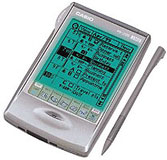
Product range can be divided into five categories: handheld computers Cassiopeia, subnotebooks Cassiopeia Fiva, electronic organizers Pocket Viewer, a family of "smart" watch Sasio and digital cameras. I must say, the device proved to be quite interesting. Sasio remained true to himself throughout: covered all areas of modern life "mobile" people, from professional activities, ending with only an amateur pastime. Each new product is aimed at specific target groups, and if used in the manufacture of high-tech products to the main account was placed on "advanced" users, but now there is a significant shift towards the masses. A good example of this are at least three of the demonstrated devices. However, start all the same with a very intelligent pocket-Computer literacy Cassiopeia E-125, calculated on a fairly narrow category of users. E-125 is positioned as "an indispensable tool in any business" and "mobile office in your pocket." Do not know about the first but the second statement is completely untrue. New Cassiopeia essentially no different from the previous model E-115. It is important that the device operates at an advanced processor (32-bit RISC (NEC VR4122) with a frequency of 150 MHz) and supports USB. According to Andrey Kuznetsov, head of mobile development company MakTsentr, Cassiopeia E-125 is a logical development of the line handheld business class from Cassio.
Closing Remarks: New products from Casio
The second model presented PDAs, EM 500, at first sight surprising atypical devices Cassiopeia design. Control buttons, of course, remain the same, but reducing the size and angularity of the body disappeared firm. Fashion today colored shell (5 colors) make a device design particularly relevant. It should be noted that the Cassiopeia EM 500, mainly aimed at young people. Talking about the device, Andrey Kuznetsov stressed new opportunities to work with a cell phone standard, GSM. In this regard, Sasio made a significant step forward. Model EM 500, as well as E-125 supports USB.
Closing Remarks: New products from Casio
Another pocket-sized novelty from Casio - Pocket Viewer PV-250X. The device operates on the basis of its own operating system Casio.According to Dmitry angrily, manager of potrebitelstkih goods Casio, this rather simple and inexpensive electronic organizer sold more than a PDA Cassiopeia. This is not surprising, because the Pocket Viewer is designed for the mass market, the device can even be classified as electronic notebooks. Asked about the plans Casio work with any other operating system except Windows CE OS and Casio, Mr. Okun said Takayuki very vaguely like the fact that "the market situation changes, the OS improved and we are keeping pace with the times, so anything is possible ... "But apparently (or more precisely - on the market success of Casio Windows CE PDAs), will soon support other operating systems is planned. Presented limelight subnotebook Cassiopeia Fiva MPC-102Series made a good impression at all. At least a few people have called him the best of today such devices. This pocket sized notebook with a videotape running with a full version of Windows 98 is fully compatible with the PC. What at first glance attracts Fiva - a stylish and surprisingly compact.
Closing Remarks: New products from Casio
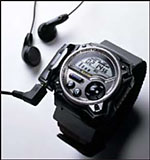
It's time to tell you about the most amazing updates from Casio. Oddly enough, this watch. New Casio digital watch is difficult to call for hours, as they have built such complex devices like MP3-player or a GPS-receiver. Perhaps, from the James Bond spy devices, embedded in all imaginable and unimaginable items of equipment, the watch is distinguished by only a few limited technical capabilities. Today, "007" can be almost everyone. Only the picture on the clock (model Wrist Camera with built-in camera) will turn out not very clear and only black and white. And the batteries in the MP3-player (model Wrist Audio Player) is enough only for 4 hours. Well, the GPS-receiver (model Pathfinder) is not very accurate. Nevertheless, a multifunctional clock more pluses than minuses. If anyone needs a convenient player for the morning runs - the clock on the arm, the wire through the hose and go! The most primitive and most compact version of the electronic organizer - a watch PC-Unite. Overview of the device from Andrei Knyazev already exists in our Library.
Closing Remarks: New products from Casio
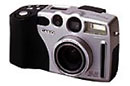
At a press conference Casio has introduced two digital cameras: QV-2300 QV-3000. Igor Glushchenko, coordinator sales representative in Moscow, Casio, very detailed account of their abilities and characteristics. Casio QV-3000, as the name implies, is a 3-megapixel digital camera with the possibility of tripling. The camera is unique. One of the best semi-professional digital cameras. Not so long ago I had a chance to work with this device, and a digital camera the results were not bad. But, frankly, in terms of quality and convenience of digital cameras is still inferior to film. Digital Camera, QV-3000, as a simple model QV-2300 is equipped with a USB port and, of course, a slot for memory cards. The standard delivery includes CF card on an 8-MB, but it always seems too little. Said QV-2300 - a brand-new 2-megapixel digital camera. Its distinguishing feature - the ability to rotate the lens at 270 Co. This allows you to shoot the sky, not raising his head (agree, it is convenient), or even yourself. In the latter case there is no need to give your precious camera in the hands of random passers-by or run out quickly when shooting with a delay. When you create a Casio QV-2300 tried to make how much friendlier user interface, but the principles of navigation, in general, are the same as in the QV-3000. Light weight (245 grams without batteries) and compactness make this device very suitable for non-professional photography.Summarized description of the QV-2300 can be the words of Igor Glushchenko: QV-2300 - a high-quality amateur chamber.
Closing Remarks: New products from Casio
Digital Camera, QV-3000, as a simple model QV-2300 is equipped with a USB port and, of course, a slot for memory cards. The standard delivery includes CF card on an 8-MB, but it always seems too little. Said QV-2300 - a brand-new 2-megapixel digital camera. Its distinguishing feature - the ability to rotate the lens at 270 Co. This allows you to shoot the sky, not raising his head (agree, it is convenient), or even yourself. In the latter case there is no need to give your precious camera in the hands of random passers-by or run out quickly when shooting with a delay. When you create a Casio QV-2300 tried to make how much friendlier user interface, but the principles of navigation, in general, are the same as in the QV-3000. Light weight (245 grams without batteries) and compactness make this device very suitable for non-professional photography. Summarized description of the QV-2300 can be the words of Igor Glushchenko: QV-2300 - a high-quality amateur chamber. , Casio has provided one of the camera QV-3000 for the drawing among the invited journalists. Happy owner of a digital camera is Vladimir Bogdanov of the magazine Computer Press. I congratulate all my heart! Would like to hope that Casio will continue to delight us with "intelligent" and stylish gadgets. The authors, translation: